When companies shop for a Digital Asset Management (DAM) system, they usually compare the big stuff: Can it handle AI tagging? Does it have a slick brand portal? Can it talk to our other software?
Those things matter. But a few months after go-live, the small stuff is what people actually complain about. Things like:
-
-
- “Why did my careful bulk edit just wipe out all our keywords?”
- “Someone dragged our whole photo folder into the wrong place and now everything’s a mess.”
- “New hires keep asking what they’re supposed to type into this field.”
-
These are the little details that rarely make it onto a feature comparison spreadsheet — but they are the ones people notice every single day. Below are a few examples worth asking about. The ideas apply no matter which DAM you are comparing.
1. Helpful hints right where you need them
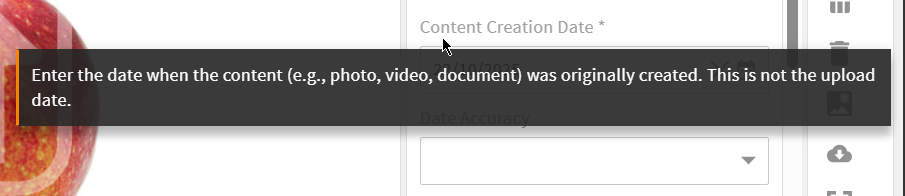
Instead of guessing what a field wants, imagine hovering over “Content Creation Date” and seeing: “Enter the date when the content was originally created. This is not the upload date.” Or a field like “Reference Number” showing a greyed-out example — ABC-12345-001 — right inside the box, so you know the expected format before you even start typing.
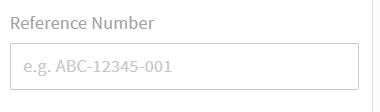
These tooltips and placeholder examples are not hardcoded either. A good system lets admins configure the wording per field, so the guidance can be tailored to how your team actually uses it.
2. Fields that reject bad data automatically
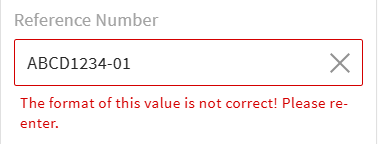
Say a reference number is supposed to follow the format ABC-12345-001. If someone types ABCD1234-01 instead, the system does not save it — it shows a message like “The format of this value is not correct! Please re-enter.”
The required pattern is not fixed either. It can be configured for each field, so the system enforces whatever format matters to your organisation.
This sounds small, but multiply it across tens of thousands of files, and it becomes clear why it matters: cleaning up messy, inconsistent data after the fact can take a team weeks. Preventing the mess in the first place takes a few minutes of setup.
3. Clear choices when files clash
Picture this: you are uploading 200 files, but 17 of them already exist in the system. What should happen?
A good system does not just guess — it shows you the conflicts and lets you decide, file by file or all at once: replace the old one, keep both (with the new one automatically renamed), or skip it. And ideally, if you choose “replace,” it keeps the existing file’s tags and descriptions instead of wiping them out.
Without this, you either lose files, lose their descriptions, or spend an hour untangling duplicates.
4. Folders that tag files for you
Instead of manually tagging every file with things like “Summer Campaign,” “Region: Asia,” or “Approved for use until December,” you can set up a folder so that anything dropped into it gets tagged automatically. Put a file into Campaigns/Summer-2026/Hero-Images/, and it instantly knows what campaign it belongs to.
This is a huge time-saver for anything that repeats often — product photos, campaign assets, files from partner agencies — and it means nobody forgets to tag something correctly.
5. Bulk editing that adds instead of erasing
This is one people do not think to ask about until it burns them. Say you want to add one more keyword to 500 files at once. Does the system:
-
-
- Add the new keyword alongside the existing ones? (what you usually want)
- Or replace everything, silently deleting all the old keywords?
-
Many systems only do the second one — which means a “quick edit” can accidentally destroy months of careful tagging. Look for a system that lets you choose: add, replace, remove one specific value, or clear everything — separately, for each field you are editing.
6. A visual “traffic light” for what you’re allowed to use
Instead of opening every file to check if you’re legally allowed to use it, imagine a simple coloured dot on the thumbnail itself: green means go ahead, yellow means there are some restrictions, red means not released to general users. You can tell at a glance, without opening a single file.
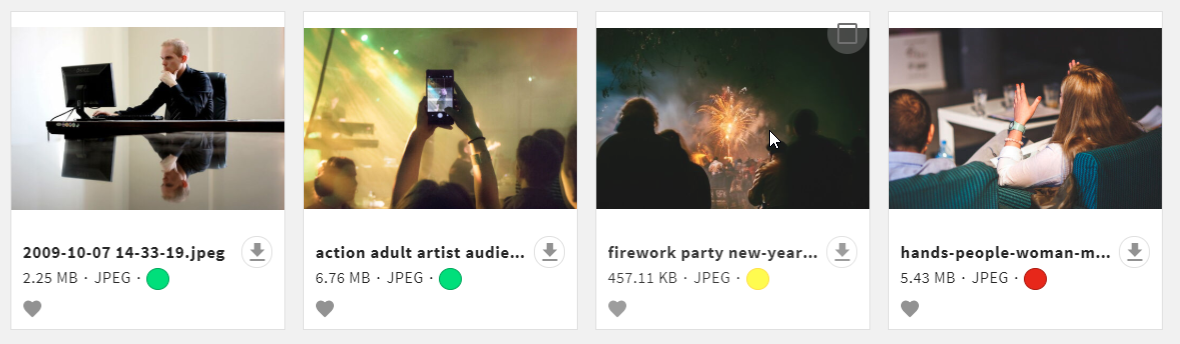
Pair that with a pop-up reminder when someone tries to download a restricted file (“this image requires approval before use — click to go through an approval process”), and you have largely solved a problem that normally requires ongoing training and policing.
7. Saved searches you can actually share
Power users in any company tend to build complicated, precise searches over time. Everyone else just recreates a rough, less accurate version of the same search from scratch — over and over.
The fix: let any saved search be kept private, shared with the whole team, or handed directly to specific people so it just shows up for them automatically. It’s a small thing, but it turns one person’s expertise into something the whole team benefits from.
8. The ability to hide features nobody needs
This might be the most underrated item on this list. A good system lets an administrator turn individual features on or off, depending on who’s using it. Two reasons this matters:
-
-
- It makes life easier for everyday users. Most people using the system are not experts — they just want to search, preview, and download a file. If their screen only shows those options, they will figure it out in five minutes instead of getting lost in a control panel built for specialists.
-
-
-
- It prevents costly accidents. Some actions — like moving or copying files between folders — are powerful, but risky in the wrong hands. One accidental drag-and-drop can break folder-based tagging or scatter a carefully organized library. If only trusted staff can do that, you avoid a painful cleanup job later.
-
When comparing systems, it’s worth asking not just “can it do this?” but “can we hide this from people who shouldn’t be doing it?”
The takeaway
None of these features show up in a splashy demo. They are not the reason a salesperson gets excited. But they are exactly the kind of thing that determines whether your team actually enjoys using the system — or quietly works around it for the next five years.
Before signing with any DAM vendor, it’s worth asking about these small things directly. They rarely come up unless you ask.